{"version":"0.1.0-alpha","name":"@storybook/addon-console","author":{"name":"Oleg Proskurin","email":"oss@usul.su","url":"https://github.com/UsulPro"},"dependencies":{"global":"^4.3.2"},"scripts":{"start":"start-storybook -p 9009","prepublish":"node .scripts/prepublish.js","build:tests":"rm -rdf .jest-dist && babel ./src -d ./.jest-dist -s","build:docs":"jsdoc2md -t docs/readme.hbs src/*.js > README.md; echo","build:storybook":"build-storybook","deploy:storybook":"storybook-to-ghpages","lint":"eslint ./src","test":"jest --watch","test:publish":"npm pack","dev:docs":"nodemon --config docs/nodemon.json -x 'npm run build:docs'","debug":"node --debug-brk --inspect npm test"},"devDependencies":{"@storybook/addon-links":"^3.0.0","@storybook/react":"^3.2.8","@storybook/storybook-deployer":"^2.0.0","babel-cli":"^6.24.1","babel-core":"^6.25.0","babel-eslint":"^7.2.3","babel-plugin-transform-md-import-to-string":"^1.0.6","babel-plugin-transform-runtime":"^6.23.0","babel-polyfill":"^6.23.0","babel-preset-env":"^1.6.0","babel-preset-react":"^6.24.1","babel-preset-stage-0":"^6.24.1","enzyme":"^2.9.1","eslint":"^4.3.0","eslint-config-airbnb":"^15.1.0","eslint-config-prettier":"^2.3.0","eslint-plugin-import":"^2.7.0","eslint-plugin-jest":"^20.0.3","eslint-plugin-json":"^1.2.0","eslint-plugin-jsx-a11y":"^6.0.2","eslint-plugin-prettier":"^2.1.2","eslint-plugin-react":"^7.1.0","jest":"^20.0.4","jest-enzyme":"^3.6.1","jsdoc-to-markdown":"^3.0.0","lint-staged":"^4.0.2","nodemon":"^1.12.0","prettier":"^1.5.3","prop-types":"^15.5.10","react":"^15.6.1","react-dom":"^15.6.1","react-scripts":"1.0.11","react-test-renderer":"^15.6.1"},"peerDependencies":{"@storybook/addon-actions":"^3.0.0","prop-types":"*","react":"*"},"gitHead":"5762e1c1b7a9318dff7139b4206abe7734d4c32f","description":"[](https://badge.fury.io/js/%40storybook%2Faddon-console) [](https://sm-react.github.io/storybook-a","_id":"@storybook/addon-console@0.1.0-alpha","_shasum":"b6e3f5adb3a5827e0388061eada4c736f634dec5","_from":".","_npmVersion":"4.2.0","_nodeVersion":"7.10.0","_npmUser":{"name":"usulpro","email":"regx@usul.su"},"dist":{"shasum":"b6e3f5adb3a5827e0388061eada4c736f634dec5","tarball":"http://registry-npm.ywwl.com/@storybook/addon-console/download/@storybook/addon-console-0.1.0-alpha.tgz","integrity":"sha512-D9OIju740/VOryldlWL3FTq4X5LcENBxCDc3zj9bsB7+SOEsJxiD8uh0mmMc3fiCosDeEaEZHD8JBi9VpGTy1g==","signatures":[{"keyid":"SHA256:jl3bwswu80PjjokCgh0o2w5c2U4LhQAE57gj9cz1kzA","sig":"MEUCIQDa8EhKcYD9OWkvnOYHViWBW0Shg5jtxVAONK++Ye4rSAIgTwerHi9AaHh/CySKaQrLi3/wM2FBJXLA2TyQtEN8oz4="}],"size":89937,"noattachment":false,"key":"/@storybook/addon-console/-/@storybook/addon-console-0.1.0-alpha.tgz"},"maintainers":[{"name":"usulpro","email":"regx@usul.su"}],"_npmOperationalInternal":{"host":"s3://npm-registry-packages","tmp":"tmp/addon-console-0.1.0-alpha.tgz_1505397533876_0.9928506202995777"},"directories":{},"readme":"\n\n
\n \n \n  \n \n
 \n \n
\n\n
\n\n# Storybook Addon Console\n\n[](https://badge.fury.io/js/%40storybook%2Faddon-console)\n[](https://github.com/storybooks/storybook-addon-console)\n[](https://storybookjs.github.io/storybook-addon-console)\n\n\n## Why\n\nThere're some cases when you can't / don't want / forgot to keep browser console opened. This addon helps you to get all\nconsole output in your storybook. In other cases, you might find it difficult to extract the desired information in the\ninformation noise issued by the console or to determine which component in what state gives the message. With this\naddon, you can control **what** you see and **where** you see.\n\nWe assume the following possible applications:\n\n- Mobile devices. You might want to make console output reachable for users when they need to work with your storybook\nfrom mobile browsers\n\n- Small screens. You can save your screen space keeping browser console closed\n\n- To filter your console output. You can independently configure both action logger and real console output in a wide\nrange.\n\n- To associate console messages with a specific components/stories. You can see which story emits which message\n\n- To output some data into Action Logger from your deep components without importing `addon-actions` for that.\n\n[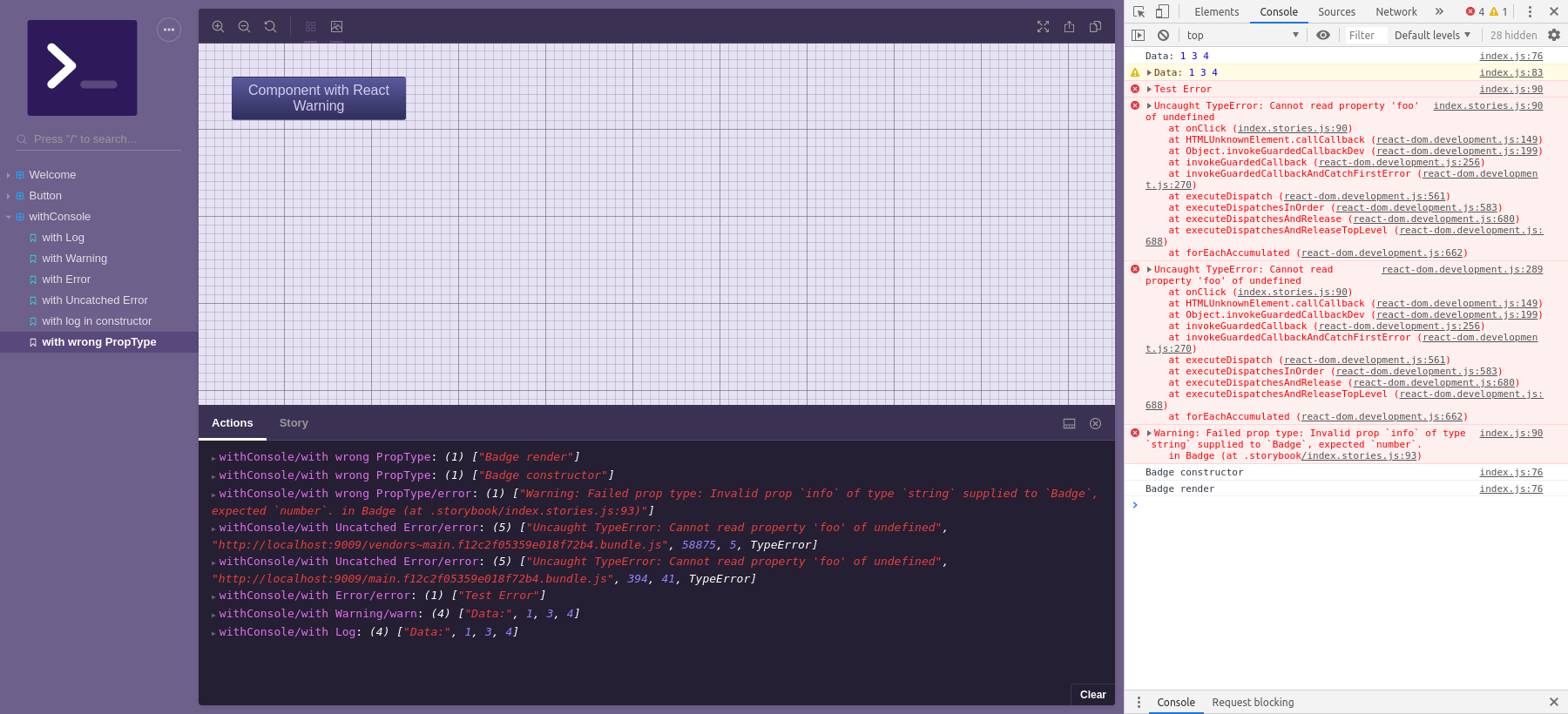](https://raw.githubusercontent.com/storybooks/storybook-addon-console/master/docs/storybook-addon-console.png)\n\ntry [live demo](https://storybookjs.github.io/storybook-addon-console)\n\n### Install\n\n```shell\nyarn add -D @storybook/addon-console @storybook/addon-actions\n```\n\n### Quick Start\n\nJust import it in your storybook config.js:\n\n```js\n// config.js\n\nimport '@storybook/addon-console';\n```\n\nThat's all. You'll start to receive all console messages, warnings, errors in your action logger panel. Everything\nexcept HMR logs.\n\nIf you want to enable HMR messages, do the following:\n\n```js\n// config.js\n\nimport { setConsoleOptions } from '@storybook/addon-console';\n\nconst panelExclude = setConsoleOptions({}).panelExclude;\nsetConsoleOptions({\n panelExclude: [...panelExclude, /deprecated/],\n});\n```\n\nYou'll receive console outputs as a `console`, `warn` and `error` actions in the panel. You might want to know from what\nstories they come. In this case, add `withConsole` decorator:\n\n```js\n// preview.js\n\nimport type { Preview } from '@storybook/react';\nimport { withConsole } from '@storybook/addon-console';\n\nconst preview: Preview = {\n decorators: [(storyFn, context) => withConsole()(storyFn)(context)],\n // ...\n};\n```\n\nAfter that your messages in Action Logger will be prefixed with the story path, like `molecules/atoms/electron:\n[\"ComponentDidMount\"]` or `molecules/atoms/electron error: [\"Warning: Failed prop type...\"]`. You can setup addon\nbehavior by passing options to `withConsole` or `setConsoleOptions` methods, both have the same API.\n\n### Panel\n\nAddon console don't have own UI panel to output logs, it use `addon-console` instead. Make sure that `main.js` contains this line:\n\n```js\n// main.js\n\nexport default {\n addons: [\n \"@storybook/addon-actions/register\",\n ],\n};\n```\n\n\n## API\n\n\n## @storybook/addon-console\nIt handles `console.log`, `console.warn`, and `console.error` methods and not catched errors. By default, it just reflects all console messages in the Action Logger Panel (should be installed as a peerDependency) except [HMR] logs.\n\n\n* [@storybook/addon-console](#module_@storybook/addon-console)\n * _static_\n * [.setConsoleOptions(optionsOrFn)](#module_@storybook/addon-console.setConsoleOptions) ⇒ addonOptions\n * [.withConsole([optionsOrFn])](#module_@storybook/addon-console.withConsole) ⇒ function\n * _inner_\n * [~addonOptions](#module_@storybook/addon-console..addonOptions) : Object\n * [~optionsCallback](#module_@storybook/addon-console..optionsCallback) ⇒ addonOptions\n\n\n\n### @storybook/addon-console.setConsoleOptions(optionsOrFn) ⇒ addonOptions\nSet addon options and returns a new one\n\n**Kind**: static method of [@storybook/addon-console](#module_@storybook/addon-console) \n**See**\n\n- addonOptions\n- optionsCallback\n\n\n| Param | Type |\n| --- | --- |\n| optionsOrFn | addonOptions \\| optionsCallback | \n\n**Example** \n```js\nimport { setConsoleOptions } from '@storybook/addon-console';\n\nconst panelExclude = setConsoleOptions({}).panelExclude;\nsetConsoleOptions({\n panelExclude: [...panelExclude, /deprecated/],\n});\n```\n\n\n### @storybook/addon-console.withConsole([optionsOrFn]) ⇒ function\nWraps your stories with specified addon options.\nIf you don't pass {`log`, `warn`, `error`} in options argument it'll create them from context for each story individually. Hence you'll see from what exact story you got a log or error. You can log from component's lifecycle methods or within your story.\n\n**Kind**: static method of [@storybook/addon-console](#module_@storybook/addon-console) \n**Returns**: function - wrappedStoryFn \n**See**\n\n- [addonOptions](#storybookaddon-consolesetconsoleoptionsoptionsorfn--addonoptions)\n- [optionsCallback](#storybookaddon-consoleoptionscallback--addonoptions)\n\n\n| Param | Type |\n| --- | --- |\n| [optionsOrFn] | addonOptions \\| optionsCallback | \n\n**Example** \n```js\nimport type { Meta, StoryObj } from '@storybook/react';\nimport { withConsole } from '@storybook/addon-console';\n\nconst meta: Meta = {\n title: 'Example/Button',\n component: Button,\n};\n\nexport default meta;\ntype Story = StoryObj;\n\nexport const Primary: Story = {\n args: {\n primary: true,\n label: 'Button',\n onClick: () => console.log(['Data:', 1, 3, 4]),\n },\n};\n // Action Logger Panel:\n // withConsole/with Log: [\"Data:\", 1, 3, 4]\n```\n\n\n### @storybook/addon-console~addonOptions : Object\nThis options could be passed to [withConsole](#storybookaddon-consolewithconsoleoptionsorfn--function) or [setConsoleOptions](#module_@storybook/addon-console.setConsoleOptions)\n\n**Kind**: inner typedef of [@storybook/addon-console](#module_@storybook/addon-console) \n**Properties**\n\n| Name | Type | Default | Description |\n| --- | --- | --- | --- |\n| [panelExclude] | [ 'Array' ].<RegExp> | [/[HMR]/] | Optional. Anything matched to at least one of regular expressions will be excluded from output to Action Logger Panel |\n| [panelInclude] | [ 'Array' ].<RegExp> | [] | Optional. If set, only matched outputs will be shown in Action Logger. Higher priority than `panelExclude`. |\n| [consoleExclude] | [ 'Array' ].<RegExp> | [] | Optional. Anything matched to at least one of regular expressions will be excluded from DevTool console output |\n| [consoleInclude] | [ 'Array' ].<RegExp> | [] | Optional. If set, only matched outputs will be shown in console. Higher priority than `consoleExclude`. |\n| [log] | string | "console" | Optional. The marker to display `console.log` outputs in Action Logger |\n| [warn] | string | "warn" | Optional. The marker to display warnings in Action Logger |\n| [error] | string | "error" | Optional. The marker to display errors in Action Logger |\n\n\n\n### @storybook/addon-console~optionsCallback ⇒ addonOptions\nThis callback could be passed to [setConsoleOptions](setConsoleOptions) or [withConsole](withConsole)\n\n**Kind**: inner typedef of [@storybook/addon-console](#module_@storybook/addon-console) \n**Returns**: addonOptions - - new [addonOptions](addonOptions) \n\n| Param | Type | Description |\n| --- | --- | --- |\n| currentOptions | addonOptions | the current [addonOptions](addonOptions) |\n\n**Example** \n```js\nimport { withConsole } from `@storybook/addon-console`;\n\nconst optionsCallback = (options) => ({panelExclude: [...options.panelExclude, /Warning/]});\nexport default {\n title: 'Button',\n decorators: [withConsole(optionsCallback)],\n};\n```\n\n\n## Contributing\n\n`yarn storybook` runs example Storybook. Then you can edit source code located in the `src` folder and example storybook in\nthe `stories` folder.\n\n### Run tests\n\nRun `yarn test`.\n\n### Run tests in watch mode\n\nRun `yarn tdd`.\n\n### Test coverage\n\nAfter running tests you can explore coverage details in `.coverage/lcov-report/index.html`\n\n### Debugging\n\nIf you're using VSCode you can debug tests and source by launching `Jest Tests` task from Debug Menu. It allows to set\nbreakpoints in `*.test.js` and `*.js` files.\n\n### Readme editing\n\nPlease, don't edit this `README.md` directly. Run `yarn dev:docs` and change `docs/readme.hbs` and JSDoc comments\nwithing `src` instead.\n\n## Credits\n\nCreated with ❤︎ to
React and
Storybook by
@usulpro [React Theming]\n