{"name":"json2csv","preferGlobal":"true","version":"4.0.0-alpha.1","description":"Convert JSON to CSV","keywords":["json","to","csv","export","convert","parse"],"author":{"name":"Mirco Zeiss","email":"mirco.zeiss@gmail.com"},"license":"MIT","bin":{"json2csv":"./bin/json2csv.js"},"main":"./lib/json2csv.js","repository":{"type":"git","url":"git+https://github.com/zemirco/json2csv.git"},"scripts":{"build":"webpack","test":"node test | tap-spec","lint":"eslint bin lib test","test-with-coverage":"nyc --reporter=text node test | tap-spec","coveralls":"nyc report --reporter=text-lcov | coveralls","deploy:docs":"docpress b && git-update-ghpages zemirco/json2csv _docpress","prepublish":"in-publish && npm run before:publish || not-in-publish","before:publish":"npm test && npm run build && npm run deploy:docs","release":"standard-version"},"dependencies":{"cli-table2":"^0.2.0","commander":"^2.8.1","flat":"^4.0.0","jsonparse":"^1.3.1","lodash.clonedeep":"^4.5.0","lodash.flatten":"^4.4.0","lodash.get":"^4.4.0","lodash.set":"^4.3.0"},"devDependencies":{"coveralls":"^3.0.0","docpress":"^0.7.0","eslint":"^4.16.0","git-update-ghpages":"^1.3.0","in-publish":"^2.0.0","nyc":"^11.4.1","standard-version":"^4.0.0","tap-spec":"^4.1.1","tape":"^4.8.0","webpack":"^1.13.1"},"readme":"# json2csv\n\nConverts json into csv with column titles and proper line endings. \nCan be used as a module and from the command line.\n\n[![npm version][npm-badge]][npm-badge-url]\n[![Build Status][travis-badge]][travis-badge-url]\n[![Coverage Status][coveralls-badge]][coveralls-badge-url]\n[![Dependency Status][dev-badge]][dev-badge-url]\n\nSee the [CHANGELOG] for details about the latest release.\n\n## Features\n\n- Uses proper line endings on various operating systems\n- Handles double quotes\n- Allows custom column selection\n- Allows specifying nested properties\n- Reads column selection from file\n- Pretty writing to stdout\n- Supports optional custom delimiters\n- Supports optional custom eol value\n- Supports optional custom quotation marks\n- Optional header.\n- If field doesn't exist in object the field value in CSV will be empty.\n- Preserve new lines in values. Should be used with \\r\\n line endings for full compatibility with Excel.\n- Add a BOM character at the beginning of the csv to make Excel displaying special characters correctly.\n\n## How to install\n\n```bash\n# Global so it can be call from anywhere\n$ npm install -g json2csv\n# or as a dependency of a project\n$ npm install json2csv --save\n```\n\n## Command Line Interface\n\n`json2csv` can be called from the command line if installed globally (using the `-g` flag).\n\n```bash\n Usage: json2csv [options]\n\n\n Options:\n\n -V, --version output the version number\n -i, --input Path and name of the incoming json file. If not provided, will read from stdin.\n -o, --output [output] Path and name of the resulting csv file. Defaults to stdout.\n -n, --ndjson Treat the input as NewLine-Delimited JSON.\n -s, --no-streaming Process the whole JSON array in memory instead of doing it line by line.\n -f, --fields Specify the fields to convert.\n -c, --fields-config [list] Specify a file with a fields configuration as a JSON array.\n -u, --unwind Creates multiple rows from a single JSON document similar to MongoDB unwind.\n -F, --flatten Flatten nested objects\n -v, --default-value [defaultValue] Specify a default value other than empty string.\n -q, --quote [value] Specify an alternate quote value.\n -Q, --double-quotes [value] Specify a value to replace double quote in strings\n -d, --delimiter [delimiter] Specify a delimiter other than the default comma to use.\n -e, --eol [value] Specify an End-of-Line value for separating rows.\n -E, --excel-strings Converts string data into normalized Excel style data\n -H, --no-header Disable the column name header\n -a, --include-empty-rows Includes empty rows in the resulting CSV output.\n -b, --with-bom Includes BOM character at the beginning of the csv.\n -p, --pretty Use only when printing to console. Logs output in pretty tables.\n -h, --help output usage information\n```\n\nAn input file `-i` and fields `-f` are required. If no output `-o` is specified the result is logged to the console.\nUse `-p` to show the result in a beautiful table inside the console.\n\n### CLI examples\n\n#### Input file and specify fields\n\n```bash\n$ json2csv -i input.json -f carModel,price,color\ncarModel,price,color\n\"Audi\",10000,\"blue\"\n\"BMW\",15000,\"red\"\n\"Mercedes\",20000,\"yellow\"\n\"Porsche\",30000,\"green\"\n```\n\n#### Input file, specify fields and use pretty logging\n\n```bash\n$ json2csv -i input.json -f carModel,price,color -p\n```\n\n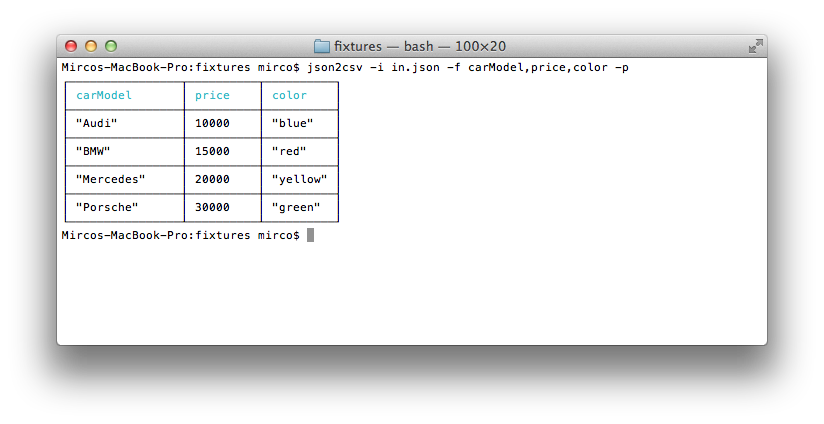\n\n#### Generating CSV containing only specific fields\n\n```bash\n$ json2csv -i input.json -f carModel,price,color -o out.csv\n$ cat out.csv\ncarModel,price,color\n\"Audi\",10000,\"blue\"\n\"BMW\",15000,\"red\"\n\"Mercedes\",20000,\"yellow\"\n\"Porsche\",30000,\"green\"\n```\n\nSame result will be obtained using passing the fields as a file.\n\n```bash\n$ json2csv -i input.json -l fieldList.txt -o out.csv\n```\n\nwhere the file `fieldList.txt` contains\n\n```\ncarModel\nprice\ncolor\n```\n\n#### Read input from stdin\n\n```bash\n$ json2csv -f price\n[{\"price\":1000},{\"price\":2000}]\n```\n\nHit Enter and afterwards CTRL + D to end reading from stdin. The terminal should show\n\n```\nprice\n1000\n2000\n```\n\n#### Appending to existing CSV\n\nSometimes you want to add some additional rows with the same columns.\nThis is how you can do that.\n\n```bash\n# Initial creation of csv with headings\n$ json2csv -i test.json -f name,version > test.csv\n# Append additional rows\n$ json2csv -i test.json -f name,version --no-header >> test.csv\n```\n\n## Javascript module\n\n`json2csv` can also be use programatically from you javascript codebase.\n\n### Available Options\n\nThe programatic APIs take a configuration object very equivalent to the CLI options. \n\n- `fields` - Array of Objects/Strings. Defaults to toplevel JSON attributes. See example below.\n- `ndjson` - Only effective on the streaming API. Indicates that data coming through the stream is NDJSON.\n- `unwind` - Array of Strings, creates multiple rows from a single JSON document similar to MongoDB's $unwind\n- `flatten` - Boolean, flattens nested JSON using [flat]. Defaults to `false`.\n- `defaultValue` - String, default value to use when missing data. Defaults to `` if not specified. (Overridden by `fields[].default`)\n- `quote` - String, quote around cell values and column names. Defaults to `\"` if not specified.\n- `doubleQuote` - String, the value to replace double quote in strings. Defaults to 2x`quotes` (for example `\"\"`) if not specified.\n- `delimiter` - String, delimiter of columns. Defaults to `,` if not specified.\n- `eol` - String, overrides the default OS line ending (i.e. `\\n` on Unix and `\\r\\n` on Windows).\n- `excelStrings` - Boolean, converts string data into normalized Excel style data.\n- `header` - Boolean, determines whether or not CSV file will contain a title column. Defaults to `true` if not specified.\n- `includeEmptyRows` - Boolean, includes empty rows. Defaults to `false`.\n- `withBOM` - Boolean, with BOM character. Defaults to `false`.\n\n### json2csv parser (Synchronous API)\n\n`json2csv` can also be use programatically as a synchronous converter using its `parse` method. \n```javascript\nconst Json2csvParser = require('json2csv').Parser;\nconst fields = ['field1', 'field2', 'field3'];\nconst opts = { fields };\n\ntry {\n const parser = new Json2csvParser(opts);\n const csv = parser.parse(myData);\n console.log(csv);\n} catch (err) {\n console.error(err);\n}\n```\n\nyou can also use the convenience method `parse`\n\n```javascript\nconst json2csv = require('json2csv').parse;\nconst fields = ['field1', 'field2', 'field3'];\nconst opts = { fields };\n\ntry {\n const csv = json2csv(myData, opts);\n console.log(csv);\n} catch (err) {\n console.error(err);\n}\n```\n\n### json2csv transform (Streaming API)\n\nThe parse method is really good but has the downside of loading the entire JSON array in memory. This might not be optimal or even possible for large JSON files.\n\nFor such cases json2csv offers a stream transform so pipe your json content into it and it will output it.\n\nOne very important difference between the transform and the parser is that the json objects are processed one by one. In practice, this means that only the fields in the first object of the array are considered and fields in other other objects that were not present in the first one are just ignored. To avoid this. It's advisable to ensure that all the objects contain exactly the same fields or provide the list of fields using the `fields` option.\n\n```javascript\nconst fs = require('fs');\nconst Json2csvTransform = require('json2csv').Transform;\n\nconst fields = ['field1', 'field2', 'field3'];\nconst opts = { fields };\n\nconst input = fs.createReadStream(inputPath, { encoding: 'utf8' });\nconst output = fs.createWriteStream(outputPath, { encoding: 'utf8' });\nconst json2csv = new Json2csvTransform(opts);\n\nconst processor = input.pipe(json2csv).pipe(output);\n\n// You can also listen for events on the conversion and see how the header or the lines are coming out.\njson2csv\n .on('header', header => console.log(header))\n .on('line', line => console.log(line))\n .on('error', err => console.log(err));\n```\n\n### Javascript module examples\n\n#### Example `fields` option\n``` javascript\n{\n fields: [\n // Supports label -> simple path\n {\n label: 'some label', // (optional, column will be labeled 'path.to.something' if not defined)\n value: 'path.to.something', // data.path.to.something\n default: 'NULL' // default if value is not found (optional, overrides `defaultValue` for column)\n },\n\n // Supports label -> derived value\n {\n label: 'some label', // Supports duplicate labels (required, else your column will be labeled [function])\n value: (row, field) => row.path1 + row.path2, // field = { label, default }\n default: 'NULL', // default if value function returns null or undefined\n stringify: true // If value is function use this flag to signal if resulting string will be quoted (stringified) or not (optional, default: true)\n },\n\n // Support pathname -> pathvalue\n 'simplepath', // equivalent to {value:'simplepath'}\n 'path.to.value' // also equivalent to {value:'path.to.value'}\n ]\n}\n```\n\n#### Example 1\n\n```javascript\nconst json2csv = require('json2csv');\nconst fs = require('fs');\nconst fields = ['car', 'price', 'color'];\nconst myCars = [\n {\n \"car\": \"Audi\",\n \"price\": 40000,\n \"color\": \"blue\"\n }, {\n \"car\": \"BMW\",\n \"price\": 35000,\n \"color\": \"black\"\n }, {\n \"car\": \"Porsche\",\n \"price\": 60000,\n \"color\": \"green\"\n }\n];\nconst csv = json2csv(myCars, { fields });\n\nconsole.log(csv);\n```\n\nwill output to console\n\n```\ncar, price, color\n\"Audi\", 40000, \"blue\"\n\"BMW\", 35000, \"black\"\n\"Porsche\", 60000, \"green\"\n```\n\n#### Example 2\n\nSimilarly to [mongoexport](http://www.mongodb.org/display/DOCS/mongoexport) you can choose which fields to export.\n\n```javascript\nconst json2csv = require('json2csv');\nconst fields = ['car', 'color'];\n\nconst csv = json2csv(myCars, { fields });\n\nconsole.log(csv);\n```\n\nResults in\n\n```\ncar, color\n\"Audi\", \"blue\"\n\"BMW\", \"black\"\n\"Porsche\", \"green\"\n```\n\n#### Example 3\n\nYou can choose custom column names for the exported file.\n\n```javascript\nconst json2csv = require('json2csv');\nconst fields = [{\n label: 'Car Name',\n value: 'car'\n},{\n label: 'Price USD',\n value: 'price'\n}];\nconst csv = json2csv(myCars, { fields });\n\nconsole.log(csv);\n```\n\n#### Example 4\n\nYou can also specify nested properties using dot notation.\n\n```javascript\nconst json2csv = require('json2csv');\nconst fs = require('fs');\nconst fields = ['car.make', 'car.model', 'price', 'color'];\nconst myCars = [\n {\n \"car\": {\"make\": \"Audi\", \"model\": \"A3\"},\n \"price\": 40000,\n \"color\": \"blue\"\n }, {\n \"car\": {\"make\": \"BMW\", \"model\": \"F20\"},\n \"price\": 35000,\n \"color\": \"black\"\n }, {\n \"car\": {\"make\": \"Porsche\", \"model\": \"9PA AF1\"},\n \"price\": 60000,\n \"color\": \"green\"\n }\n];\nconst csv = json2csv(myCars, { fields });\n\nconsole.log(csv);\n```\n\nwill output to console\n\n```\ncar.make, car.model, price, color\n\"Audi\", \"A3\", 40000, \"blue\"\n\"BMW\", \"F20\", 35000, \"black\"\n\"Porsche\", \"9PA AF1\", 60000, \"green\"\n```\n\n#### Example 5\n\nUse a custom delimiter to create tsv files. Add it as the value of the delimiter property on the parameters:\n\n```javascript\nconst json2csv = require('json2csv');\nconst fields = ['car', 'price', 'color'];\nconst tsv = json2csv(myCars, { fields, delimiter: '\\t' });\n\nconsole.log(tsv);\n```\n\nWill output:\n\n```\ncar price color\n\"Audi\" 10000 \"blue\"\n\"BMW\" 15000 \"red\"\n\"Mercedes\" 20000 \"yellow\"\n\"Porsche\" 30000 \"green\"\n```\n\nIf no delimiter is specified, the default `,` is used\n\n#### Example 6\n\nYou can choose custom quotation marks.\n\n```javascript\nconst json2csv = require('json2csv');\nconst fields = [{\n label: 'Car Name',\n value: 'car'\n},{\n label: 'Price USD',\n value: 'price'\n}];\nconst csv = json2csv(myCars, { fields, quote: '' });\n\nconsole.log(csv);\n```\n\nResults in\n\n```\nCar Name, Price USD\nAudi, 10000\nBMW, 15000\nPorsche, 30000\n```\n\n#### Example 7\n\nYou can unwind arrays similar to MongoDB's $unwind operation using the `unwind` option.\n\n```javascript\nconst json2csv = require('json2csv');\nconst fs = require('fs');\nconst fields = ['carModel', 'price', 'colors'];\nconst myCars = [\n {\n \"carModel\": \"Audi\",\n \"price\": 0,\n \"colors\": [\"blue\",\"green\",\"yellow\"]\n }, {\n \"carModel\": \"BMW\",\n \"price\": 15000,\n \"colors\": [\"red\",\"blue\"]\n }, {\n \"carModel\": \"Mercedes\",\n \"price\": 20000,\n \"colors\": \"yellow\"\n }, {\n \"carModel\": \"Porsche\",\n \"price\": 30000,\n \"colors\": [\"green\",\"teal\",\"aqua\"]\n }\n];\nconst csv = json2csv(myCars, { fields, unwind: 'colors' });\n\nconsole.log(csv);\n```\n\nwill output to console\n\n```\n\"carModel\",\"price\",\"colors\"\n\"Audi\",0,\"blue\"\n\"Audi\",0,\"green\"\n\"Audi\",0,\"yellow\"\n\"BMW\",15000,\"red\"\n\"BMW\",15000,\"blue\"\n\"Mercedes\",20000,\"yellow\"\n\"Porsche\",30000,\"green\"\n\"Porsche\",30000,\"teal\"\n\"Porsche\",30000,\"aqua\"\n```\n\n#### Example 8\n\nYou can also unwind arrays multiple times or with nested objects.\n\n```javascript\nconst json2csv = require('json2csv');\nconst fs = require('fs');\nconst fields = ['carModel', 'price', 'items.name', 'items.color', 'items.items.position', 'items.items.color'];\nconst myCars = [\n {\n \"carModel\": \"BMW\",\n \"price\": 15000,\n \"items\": [\n {\n \"name\": \"airbag\",\n \"color\": \"white\"\n }, {\n \"name\": \"dashboard\",\n \"color\": \"black\"\n }\n ]\n }, {\n \"carModel\": \"Porsche\",\n \"price\": 30000,\n \"items\": [\n {\n \"name\": \"airbag\",\n \"items\": [\n {\n \"position\": \"left\",\n \"color\": \"white\"\n }, {\n \"position\": \"right\",\n \"color\": \"gray\"\n }\n ]\n }, {\n \"name\": \"dashboard\",\n \"items\": [\n {\n \"position\": \"left\",\n \"color\": \"gray\"\n }, {\n \"position\": \"right\",\n \"color\": \"black\"\n }\n ]\n }\n ]\n }\n];\nconst csv = json2csv(myCars, { fields, unwind: ['items', 'items.items'] });\n\nconsole.log(csv);\n```\n\nwill output to console\n\n```\n\"carModel\",\"price\",\"items.name\",\"items.color\",\"items.items.position\",\"items.items.color\"\n\"BMW\",15000,\"airbag\",\"white\",,\n\"BMW\",15000,\"dashboard\",\"black\",,\n\"Porsche\",30000,\"airbag\",,\"left\",\"white\"\n\"Porsche\",30000,\"airbag\",,\"right\",\"gray\"\n\"Porsche\",30000,\"dashboard\",,\"left\",\"gray\"\n\"Porsche\",30000,\"dashboard\",,\"right\",\"black\"\n```\n\n## Building\n\nWhen developing, it's necessary to run `webpack` to prepare the built script. This can be done easily with `npm run build`.\n\nIf `webpack` is not already available from the command line, use `npm install -g webpack`.\n\n## Testing\n\nRun the folowing command to check the code style.\n\n```bash\n$ npm run lint\n```\n\nRun the following command to run the tests and return coverage\n\n```bash\n$ npm run test-with-coverage\n```\n\n## Contributors\n\nAfter you clone the repository you just need to install the required packages for development by runnning following command under json2csv dir.\n\n```bash\n$ npm install\n```\n\nBefore making any pull request please ensure sure that your code is formatted, test are passing and test coverage haven't decreased. (See [Testing](#testing))\n\n## Similar Projects\n\n* [Papa Parse](http://papaparse.com/)\n\n## License\n\nSee [LICENSE.md].\n\n[npm-badge]: https://badge.fury.io/js/json2csv.svg\n[npm-badge-url]: http://badge.fury.io/js/json2csv\n[travis-badge]: https://travis-ci.org/zemirco/json2csv.svg\n[travis-badge-url]: https://travis-ci.org/zemirco/json2csv\n[coveralls-badge]: https://coveralls.io/repos/zemirco/json2csv/badge.svg?branch=master\n[coveralls-badge-url]: https://coveralls.io/r/zemirco/json2csv?branch=master\n[dev-badge]: https://david-dm.org/zemirco/json2csv.svg\n[dev-badge-url]: https://david-dm.org/zemirco/json2csv\n[CHANGELOG]: https://github.com/zemirco/json2csv/blob/master/CHANGELOG.md\n[LICENSE.md]: https://github.com/zemirco/json2csv/blob/master/LICENSE.md\n[flat]: https://www.npmjs.com/package/flat\n","readmeFilename":"README.md","gitHead":"48f5549e7f0756e70da0f521eff9affff2521622","bugs":{"url":"https://github.com/zemirco/json2csv/issues"},"homepage":"https://github.com/zemirco/json2csv#readme","_id":"json2csv@4.0.0-alpha.1","_npmVersion":"5.6.0","_nodeVersion":"8.9.1","_npmUser":{"name":"knownasilya","email":"ilya@burstcreations.com"},"dist":{"integrity":"sha512-AQmHIFHfa+DG/e1qSnVAvPD2EW+CjYDKkupnApSOKtZlTBhzUK5gqjyhsYMSNUgTpQKwRkaLmRwZgSsD5OE35Q==","shasum":"349dbb2bd17a3c8802ac8fb1df7bc7d4fbf882e5","tarball":"http://registry-npm.ywwl.com/json2csv/download/json2csv-4.0.0-alpha.1.tgz","fileCount":19,"unpackedSize":460261,"signatures":[{"keyid":"SHA256:jl3bwswu80PjjokCgh0o2w5c2U4LhQAE57gj9cz1kzA","sig":"MEUCIQCcPl0T+KRrBYaJes0eKIVpprc9DlZDCVhca7h7SfXSHAIgLwUwY5rogM/c4II+5KtV3IawXzY/oAp+H3b0T6wms+I="}],"size":105580,"noattachment":false,"key":"/json2csv/-/json2csv-4.0.0-alpha.1.tgz"},"maintainers":[{"email":"azhang@bottlenose.com","name":"azhang"},{"email":"juanjo.diazmo@gmail.com","name":"juanjodiaz"},{"email":"ilya@burstcreations.com","name":"knownasilya"},{"email":"mirco.zeiss@gmail.com","name":"zemirco"}],"directories":{},"_npmOperationalInternal":{"host":"s3://npm-registry-packages","tmp":"tmp/json2csv_4.0.0-alpha.1_1519221338976_0.5035883235418779"},"_hasShrinkwrap":false,"deprecated":"Package no longer supported. Contact Support at https://www.npmjs.com/support for more info.","publish_time":1519221339037,"_cnpm_publish_time":1519221339037,"dist-tags":{"alpha":"6.0.0-alpha.0","latest":"6.0.0-alpha.2","prerelease":"4.0.0-alpha.2"}}