{"name":"vscode-html-languageservice","version":"5.0.2","description":"Language service for HTML","main":"./lib/umd/htmlLanguageService.js","typings":"./lib/umd/htmlLanguageService","module":"./lib/esm/htmlLanguageService.js","author":{"name":"Microsoft Corporation"},"repository":{"type":"git","url":"git+https://github.com/Microsoft/vscode-html-languageservice.git"},"license":"MIT","bugs":{"url":"https://github.com/Microsoft/vscode-html-languageservice"},"devDependencies":{"@types/mocha":"^9.1.1","@types/node":"16.x","@typescript-eslint/eslint-plugin":"^5.37.0","@typescript-eslint/parser":"^5.37.0","@vscode/web-custom-data":"^0.4.2","eslint":"^8.15.0","js-beautify":"^1.14.6","mocha":"^10.0.0","rimraf":"^3.0.2","typescript":"^4.8.3"},"dependencies":{"vscode-languageserver-textdocument":"^1.0.7","vscode-languageserver-types":"^3.17.2","vscode-nls":"^5.2.0","vscode-uri":"^3.0.4"},"scripts":{"prepublishOnly":"npm run clean && npm run compile-esm && npm run test && npm run remove-sourcemap-refs","postpublish":"node ./build/post-publish.js","compile":"tsc -p ./src && npm run copy-jsbeautify","compile-esm":"tsc -p ./src/tsconfig.esm.json","watch":"tsc -w -p ./src && npm run copy-jsbeautify","clean":"rimraf lib","remove-sourcemap-refs":"node ./build/remove-sourcemap-refs.js","test":"npm run compile && mocha ./lib/umd/test/*.js && npm run lint","lint":"eslint src/**/*.ts","install-types-next":"yarn add vscode-languageserver-types@next -f -S && yarn add vscode-languageserver-textdocument@next -f -S","copy-jsbeautify":"node ./build/copy-jsbeautify.js","update-jsbeautify":"yarn add js-beautify && node ./build/update-jsbeautify.js","update-jsbeautify-next":"yarn add js-beautify@next && node ./build/update-jsbeautify.js","update-data":"yarn add @vscode/web-custom-data -D && node ./build/generateData.js","preversion":"npm test","postversion":"git push && git push --tags"},"gitHead":"bc98617196b13825f33e9bf29663cc76c64ecbad","homepage":"https://github.com/Microsoft/vscode-html-languageservice#readme","_id":"vscode-html-languageservice@5.0.2","_nodeVersion":"16.15.1","_npmVersion":"8.11.0","dist":{"integrity":"sha512-TQmeyE14Ure/w/S+RV2IItuRWmw/i1QaS+om6t70iHCpamuTTWnACQPMSltVGm/DlbdyMquUePJREjd/h3AVkQ==","shasum":"a66cb9d779f3094a8d14dd3a8f7935748435fd2a","tarball":"http://registry-npm.ywwl.com/vscode-html-languageservice/download/vscode-html-languageservice-5.0.2.tgz","fileCount":77,"unpackedSize":1589224,"signatures":[{"keyid":"SHA256:jl3bwswu80PjjokCgh0o2w5c2U4LhQAE57gj9cz1kzA","sig":"MEUCIQDYhIWzzktFV5bLZnLx6Wh05FUixMtILTVu57k1HCrxOQIgNy8hKw5zP/dSYdeOxgF6g8WuMef1rnwoevpYkgyMiKw="}],"npm-signature":"-----BEGIN PGP SIGNATURE-----\r\nVersion: OpenPGP.js v4.10.10\r\nComment: https://openpgpjs.org\r\n\r\nwsFzBAEBCAAGBQJjIxNQACEJED1NWxICdlZqFiEECWMYAoorWMhJKdjhPU1b\r\nEgJ2Vmo4Mw/9GpeIDBqqckP4zypmb3zYRv6VQ4R3VGdJ6W0V2lCzB+nEmsFw\r\nGzRWd34Ow2or8jOqNgWpgwENGJi0tm8exB3ENFl0C6VBG3QCa6AY7XItphNT\r\ntnA1zWeklYCKmzFs+JXjctgsj2ygvGE4ajMRDpGVcNPYD5Ovg1wQsq9pR0nN\r\nEyqSgpXTEZESiLfiovwjgqT77AytLKJzz6js5neUjkm/E2uT9XFJY++BTliZ\r\nsxFEzQsV81XrT70ljZmfJmgH27nH7iSy+usHHol1XvVigYL/TIwCrTkcNrxn\r\nEEjsMSbUM50OLAjiaIniTiAaAoi05LcGdLqxYm1Noc8wDQiap6QN33nGsc7Z\r\nhdvqcJjTtqJLwktMZvokVb4O341npHLoNGyvvotfyk/VNWUS6XTYaMXeW4Bz\r\noBJRsYLSF7aAWmV6A5o+NCjQrlh7R2Sxi+sF43GamUDeJJNOyuVktGNgbzij\r\nNb7DmuSdYjcCK1qEj5TlTlojp3qWdCc5JIo+ByHduZDIDRtKPkyt/do9G2m3\r\ns0uywb3FUvIeMM1JCDJXTlMqYDCaDtQETCyooya5n846PYMGLU6OBpk5YYHE\r\nEdx4OHGdWjTsExSaSYW7jmv4nwfpSFJANRTYsizl31hhpasOnGO0IdFMKU3B\r\nsU/DSs9x39GWjIz8nVkHEI2BDZRKIc+lo3s=\r\n=+UFw\r\n-----END PGP SIGNATURE-----\r\n","size":259069,"noattachment":false,"key":"/vscode-html-languageservice/-/vscode-html-languageservice-5.0.2.tgz"},"_npmUser":{"name":"aeschli","email":"martinae@microsoft.com"},"directories":{},"maintainers":[{"name":"egamma","email":"egamma@microsoft.com"},{"name":"alexandrudima","email":"alexdima@microsoft.com"},{"name":"aeschli","email":"martinae@microsoft.com"},{"name":"dbaeumer","email":"dirk.baeumer@gmail.com"},{"name":"joaomoreno.ms","email":"joao.moreno@microsoft.com"}],"_npmOperationalInternal":{"host":"s3://npm-registry-packages","tmp":"tmp/vscode-html-languageservice_5.0.2_1663243087770_0.663010365637152"},"_hasShrinkwrap":false,"readme":"# vscode-html-languageservice\nHTML language service extracted from VSCode to be reused, e.g in the Monaco editor.\n\n[](https://www.npmjs.org/package/vscode-html-languageservice)\n[](https://npmjs.org/package/vscode-html-languageservice)\n[](https://github.com/microsoft/vscode-html-languageservice/actions)\n[](https://opensource.org/licenses/MIT)\n\nWhy?\n----\n\nThe _vscode-html-languageservice_ contains the language smarts behind the HTML editing experience of Visual Studio Code\nand the Monaco editor.\n\n - *doComplete* / *doComplete2* (async) provide completion proposals for a given location.\n - *setCompletionParticipants* allows participant to provide suggestions for specific tokens.\n - *doHover* provides hover information at a given location.\n\n - *format* formats the code at the given range.\n - *findDocumentLinks* finds all links in the document.\n - *findDocumentSymbols* finds all the symbols in the document.\n - *getFoldingRanges* return folding ranges for the given document.\n - *getSelectionRanges* return the selection ranges for the given document.\n ...\n\n For the complete API see [htmlLanguageService.ts](./src/htmlLanguageService.ts) and [htmlLanguageTypes.ts](./src/htmlLanguageTypes.ts)\n\nInstallation\n------------\n\n npm install --save vscode-html-languageservice\n\nDevelopment\n-----------\n\n- clone this repo, run `npm i``\n- `npm test` to compile and run tests\n\n\nHow can I run and debug the service?\n\n- open the folder in VSCode.\n- set breakpoints, e.g. in `htmlCompletion.ts`\n- run the Unit tests from the run viewlet and wait until a breakpoint is hit:\n\n\n\nHow can I run and debug the service inside an instance of VSCode?\n\n- run VSCode out of sources setup as described here: https://github.com/Microsoft/vscode/wiki/How-to-Contribute\n- link the folder of the `vscode-html-languageservice` repo to `vscode/extensions/html-language-features/server` to run VSCode with the latest changes from that folder:\n - cd `vscode-html-languageservice`, `npm link`\n - cd `vscode/extensions/html-language-features/server`, `npm link vscode-html-languageservice`\n- run VSCode out of source (`vscode/scripts/code.sh|bat`) and open a `.html` file\n- in VSCode window that is open on the `vscode-html-languageservice` sources, run command `Debug: Attach to Node process` and pick the `code-oss` process with the `html-language-features` path\n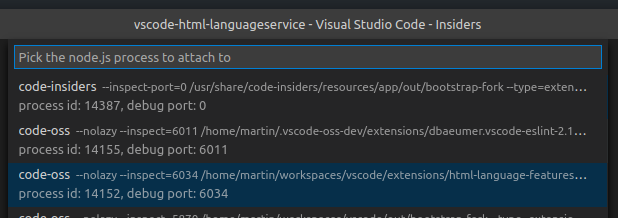\n- set breakpoints, e.g. in `htmlCompletion.ts`\n- in the instance run from sources, invoke code completion in the `.html` file\n\n\nLicense\n-------\n\n(MIT License)\n\nCopyright 2016-2023, Microsoft\n\n`src/languageFacts/data/webCustomData.ts` (shipped as `lib/esm/languageFacts/data/webCustomData.ts` and `lib/umd/languageFacts/data/webCustomData.ts`)\nare built upon content from [Mozilla Developer Network](https://developer.mozilla.org/en-US/docs/Web) and distributed under CC BY-SA 2.5.\n","publish_time":1663243088020,"_cnpm_publish_time":1663243088020,"dist-tags":{"latest":"5.6.2","next":"6.0.0-next.2"}}